A file system inside a file
An MSG file is Microsoft Outlook's format for a single item — an email, contact, calendar appointment, or task. Under the hood it is a Compound File Binary (CFB) container, the same technology used by legacy .doc and .xls files before the modern XML formats arrived.
Think of CFB as a miniature file system inside one file. The container is divided into sectors, and every piece of data — the email body, the headers, each attachment — lives in its own named stream. That design lets Outlook store a complex, structured item as a single portable file.
What is actually inside an MSG file
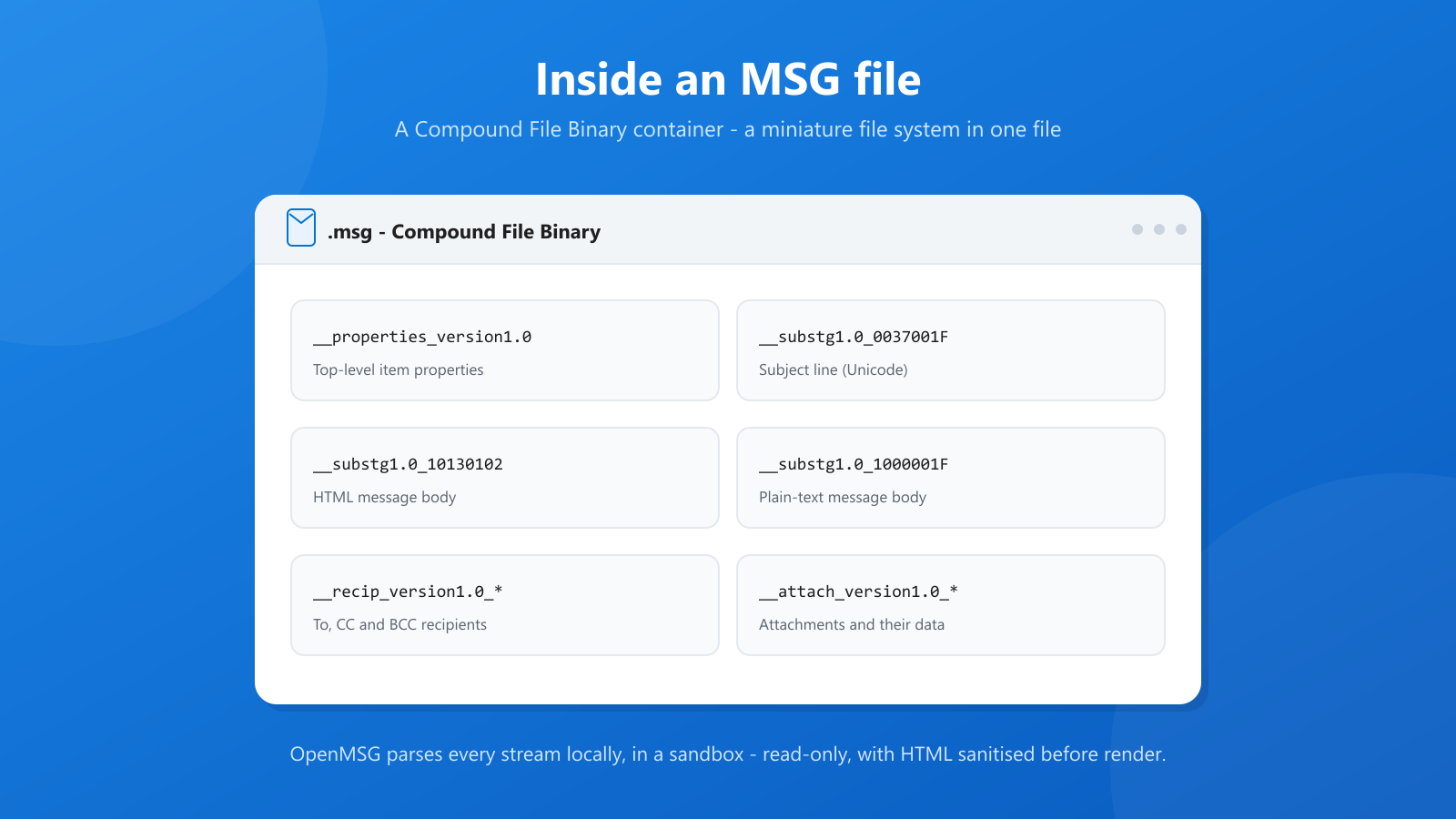
Open an MSG file with a CFB-aware tool and a distinctive layout appears. Stream names use MAPI property tags — a hexadecimal property ID and a type code — so they look cryptic, but the structure is consistent:
| Stream | What it holds |
|---|---|
| __properties_version1.0 | Top-level properties such as subject, sender, and dates |
| __substg1.0_0037001F | The message subject in Unicode |
| __substg1.0_1000001F | The plain-text message body |
| __substg1.0_10130102 | The HTML message body |
| __recip_version1.0_* | One stream group per recipient, including To, CC, and BCC |
| __attach_version1.0_* | One stream group per attachment, plus the attachment data |
| __nameid_version1.0 | Named properties Outlook uses for custom fields |
An MSG file might also contain embedded OLE objects, inline images referenced by the HTML body, and receipt or meeting-related data.
MAPI properties: the real structure
The numbers in those stream names are MAPI property tags. Each property has a numeric ID and a data type — for example, a Unicode string, a binary blob, or a timestamp. PidTagSubject is the subject, PidTagBody is the plain-text body, PidTagHtml is the HTML body, and PidTagAttachDataBinary holds an attachment's bytes.
This property system is what gives MSG its fidelity. Outlook-specific concepts — follow-up flags, categories, voting buttons, delivery and read receipts — are all just additional properties. EML, being a transmitted-message format, has nowhere to put them. That is the core trade-off between the two formats, which we cover in MSG vs EML: Email File Formats Explained.
Why Windows cannot open MSG files natively
Despite the format being Microsoft's own, Windows has never included a default MSG handler. Registering the extension with a useful application would require CFB and MAPI parsing logic that simply is not part of the operating system.
So when Outlook is not installed, the shell falls back to the "How do you want to open this file?" dialog. A viewer has to do real work: read the CFB directory, walk the MAPI properties, resolve each recipient and attachment stream, reconstruct the HTML body, and map inline image references back to their data.
A few details make that work harder than it first appears:
- Property types vary. The same logical field can be stored as a Unicode string, an ANSI string, or a binary blob, and a robust parser has to handle all of them.
- Bodies come in pairs. Most messages carry both plain-text and HTML versions, plus inline image references that are stored as separate attachment streams.
- Attachments nest. An MSG file can contain another MSG file as an attachment, which must be detected and opened as its own item.
- The format is untrusted input. Every field length, stream offset, and property count has to be validated, because an MSG file is ultimately a file a stranger can send you.
Why the format matters for security
An MSG file is untrusted input by definition, and the format is capable of carrying more than a friendly email:
- Remote content. An HTML body can reference images hosted on an attacker-controlled server, turning "open email" into "phone home".
- Scripts and redirects. HTML email can attempt to execute script or auto-redirect the renderer.
- Disguised attachments. A file can claim to be a PDF while carrying an executable payload, or use Unicode bidirectional characters to make a filename look like something it is not.
- Embedded objects. The CFB container can hold OLE objects and streams that deserve suspicion rather than automatic opening.
These risks are why a viewer should treat MSG files as hostile and sanitise aggressively.
How OpenMSG reads an MSG file
OpenMSG is purpose-built to parse CFB and MAPI structures and present the result in a clean, native Windows interface. When you open a file it:
- Reads the CFB directory and resolves the item's MAPI properties.
- Extracts the plain-text and HTML bodies, then sanitises the HTML — by default stripping JavaScript event handlers, javascript: links, and automatic redirects.
- Injects a strict content policy that blocks external images and assets by default, with an explicit Show content option per message.
- Resolves inline images from temporary local copies so the email body renders correctly.
- Lists every attachment with its type icon, filename, and size, checking each against a safe-extension list and verifying that file contents match the claimed type.
- Parses everything inside an isolated AppContainer sandbox by default, and never writes to the original MSG file.
Default limits keep parsing predictable and safe: MSG files up to 3 GB, individual attachments up to 1 GB, and up to 100 attachments per message. Administrators can tighten or adjust these values in managed deployments.
The bottom line
An MSG file is not a simple text document — it is a structured binary container with its own internal file system and a property model rich enough to preserve an Outlook item exactly as it was. That richness is why the format is so good at archiving and so difficult to open without the right tool. A dedicated, sandboxed viewer like OpenMSG turns that complexity into a single double-click.